
Guide · Step 1 of 8
Install
Pick the download for your graphics card, unzip it and start the app.
What you need
- Windows 10 (21H2 or newer) or Windows 11, 64-bit.
- An NVIDIA GeForce RTX card: RTX 20, 30, 40 or 50 series. An AMD Radeon RX 7000 or 9000 works with the Radeon edition.
- For the live camera: VRChat, on desktop or in VR.
Nothing else. The DLSS 5 runtime is in the download, in one build for RTX 50 and one for RTX 40, 30 and 20. The app picks the right one by itself.
Download and unzip
Open the download section and pick the file for your card. For a GeForce card it is
VRChatDLSS5Cam-win64.zip.Right-click the zip and choose Extract All. Pick a folder you own, for example Documents.
A new folder with
VRChatDLSS5Cam.exeinside.Double-click
VRChatDLSS5Cam.exe.A small card with the app's icon appears, then the window.
The setup guide
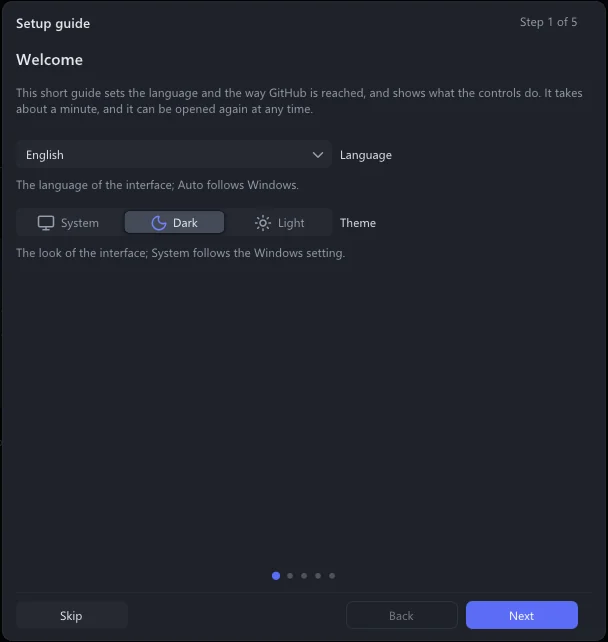
The first start opens a short setup guide with five pages:
Welcome: the language, and the look (System, Dark or Light).
GitHub access: how the app reaches GitHub for updates. Keep GitHub directly. Where GitHub is slow or blocked, choose Mirror sites, the fastest one.
How the program works
What the settings do
Where to find things: this guide, the documentation, AI Q&A and the search box. When the guide closes, these places light up for a moment.
Next goes on, Skip closes it. To see it again later: About → Setup guide.
Graphics driver
DLSS 5 needs GeForce driver 616.56 or newer. The app checks the driver at every start and tells you when yours is older:
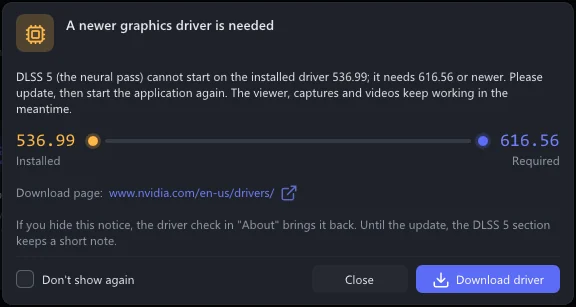
Click Download driver. NVIDIA's download page opens in your browser.
Install the newest driver for your card.
Start the app again.
The notice no longer appears, and DLSS 5 Neural Rendering says Active.
With an older driver everything else still works: the viewer, captures and videos. Only DLSS 5 does not start.