
Guide · Step 7 of 8
Where files are saved
Choose the folder and the file names, keep transparency, and find the app's own files.
Everything the app saves goes into one folder: photos from the live camera, and processed pictures and videos. At first that is Pictures\VRChat DLSS5 Cam in your user folder.
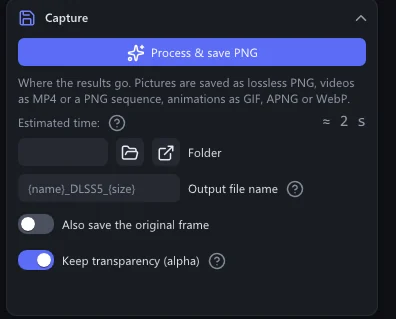
Choose another folder
Open Capture. Next to Folder, click the folder button (Browse…) and pick a folder.
The box shows the new folder. The next file goes there.
The button beside it (Open) shows the folder in Explorer. Empty the box to go back to Pictures\VRChat DLSS5 Cam.
File names
Names come from a template. In picture and video mode the box is called Output file name, in live mode File name. The app fills in these words:
| Word | Becomes |
|---|---|
{name} | The source file's name, or VRChat for a live photo. |
{date} | The day, like 2026-09-14. |
{time} | The time of day, like 12-34-56.123. |
{size} | The saved size, like 1920x1080. |
{width}, {height} | The saved width and height. |
{insize}, {inwidth}, {inheight} | The same for the source. |
Everything else stays as you type it. When a name is already taken, the app adds _2, _3 and so on, so nothing is ever overwritten. An empty box uses the default:
| Saved from | Default template |
|---|---|
| The live camera | VRChat_DLSS5_{date}_{time}_{size} |
| Pictures and videos | {name}_DLSS5_{size} |
More options
- Also save the original frame: also saves the picture as it came in, before DLSS 5.
- Keep transparency (alpha): keeps a transparent background, for example when VRChat streams with transparency. On at first. Shows while Advanced is on.
- Global hotkey (live mode): the keys that save a photo while VRChat is in front. Ctrl+Alt+P at first.
- Auto capture every (seconds) (live mode): a photo at this interval. 0 = off.
The app's own folders
The folder you unzipped
anywhere you like, for example Documents
VRChatDLSS5Cam-win64\
VRChatDLSS5Cam.exethe program: double-click to startruntimes\DLSS 5 runtime, one build for RTX 50, one for RTX 40 / 30 / 20models\the depth networklicenses\licence textsdocs\the README files and these documentsREADME.mdthe full reference
Settings folder
made by the program, in your user profile
%LOCALAPPDATA%\VRChatDLSS5Cam\
settings.inievery settingpresets.txtyour presetslog.txt, log-1.txt … log-5.txtthe log of this session, and of the five before itlog-crash.txt, crash.txtonly after a crash
Your pictures
where saved files go, unless you choose another folder
Pictures\VRChat DLSS5 Cam\
*.png, *.mp4, *.webp …captures, pictures, videos
About → Open settings folder opens the settings folder, Open log file the log.
Once you have opened AI Q&A, the settings folder also holds a webview2 folder with the panel's cookies and storage.