
Guide · Step 8 of 8
Updates
How the app finds and installs a new version, and what to do where GitHub is slow.
- Check at startGitHub or a mirror site
- Update availablenotes in your language
- Update nowdownloads and unpacks
- Restartsettings and library stay
A new version
At every start the app asks GitHub whether a newer version exists. When there is one, a window shows the version and what changed, in your language.
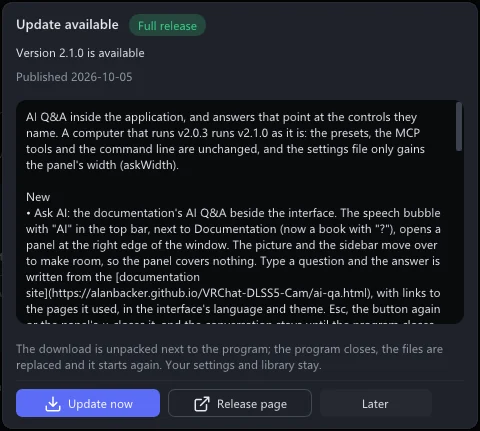
- Update now downloads the new version, closes the app, replaces its files and starts it again. Your settings, presets and library stay as they are.
- Release page opens the release in your browser.
- Later closes the window.
Stable or Pre-release
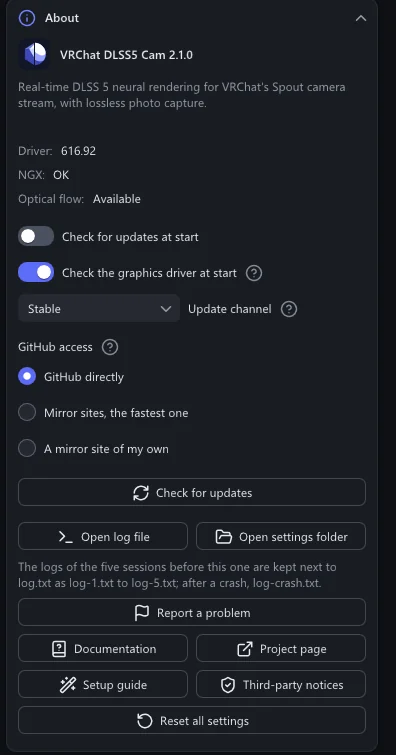
About → Update channel:
- Stable: full releases only. Choose this if you just want the app to work.
- Pre-release: also the test builds that come before a full release. You get new things earlier, and sometimes new problems.
Check for updates looks right away. Check for updates at start turns the automatic check off.
Where GitHub is slow or blocked
In some regions, mainland China among them, GitHub is slow or cannot be reached. About → GitHub access offers:
- GitHub directly: the default.
- Mirror sites, the fastest one: the app measures eight known mirror sites and uses the fastest. Measure the sites shows how each one answered.
- A mirror site of my own: the address of a site you trust that relays GitHub.
When no site answers, a window offers the other choices.